







For environmental consultants and trade associations in Italy

Your clients’ RENTRI paperwork,
complete before it reaches your office.

Workers send data and photos from the site, even without signal. Your firm gets records already checked and ready for your software, with deadlines on a board. For the Italian RENTRI rules, under your firm’s brand, one-time setup.

Clients asking whether they must register?
Send them the 1-minute check (in Italian)

What every firm deals with

What fills your day today.

  • Photos and voice notes on WhatsApp to retype

    Workers send the data from site through a link, with job, quantity, carrier and photo. Your firm gets the record already complete and checked.

  • Deadlines for dozens of clients

    10 working days to record, end of the following month to send (for delegates, the second month). The board lines them up by client. From 15/09/2026 fines apply to form data that was not sent.

  • Records stuck waiting for the client

    An "about to expire" board with the reminder already written. One tap and the WhatsApp message goes out with the link to complete it.

  • The RENTRI portal freezing and clients calling

    Client garages get FIR Officina with RENTRI down mode, which keeps outage evidence and a spare paper form and guides the catch-up.

  • Rules that change

    Directorial Decree 210 of 31/07/2026 changed the instructions for register and form. Checks and deadlines use the rules in force on each record’s date.

  • "Do I have to?" asked ten times a day

    Send clients the guided check, four questions and an answer with sources. They call you when it really matters.

  • A supply chain that does not line up

    Every record and every form has its status. The carrier gets the pickup details through a link, no retyping.

  • Old site phones and no signal

    The official RENTRI app needs Android 10 or iOS 16. The site app opens in the browser on old phones and without signal, and it sends when the signal is back.

From the site

The site sends a record, not a chat.

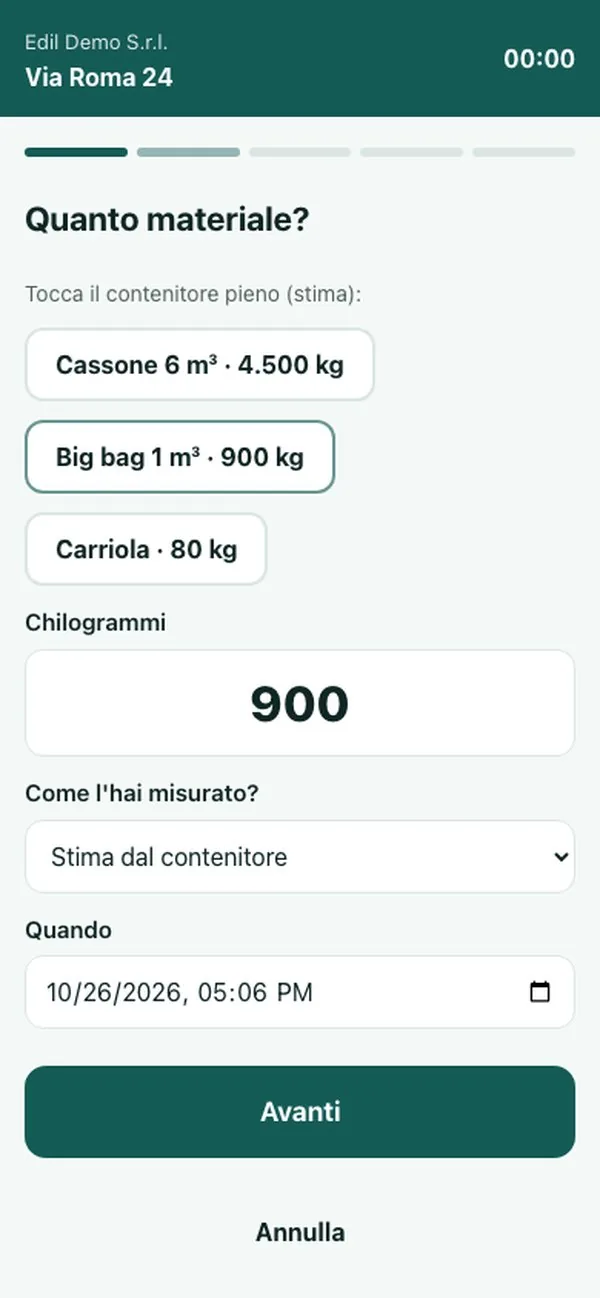
Each site has a link and a QR code. The worker opens it with no password, picks the job, gives the quantity by container, takes a photo and sends. The EER code is proposed by your firm from its approved list, so the worker does not need to know it.

  • No app to install, no password
  • Without signal they fill it in anyway and it sends when the signal is back
  • Quantity estimated from the container, such as a skip, big bag or wheelbarrow
  • Location data removed from photos before sending
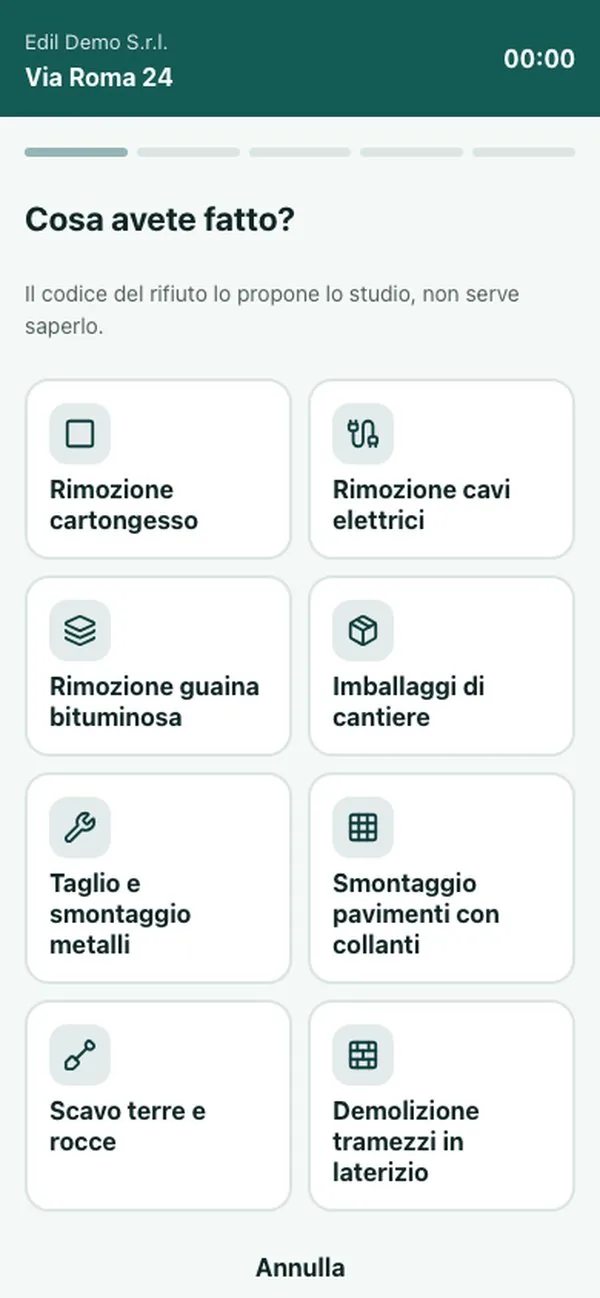
Site app (in Italian) showing the choice of job, for example plasterboard removal, partition wall demolition, earth and rock excavation
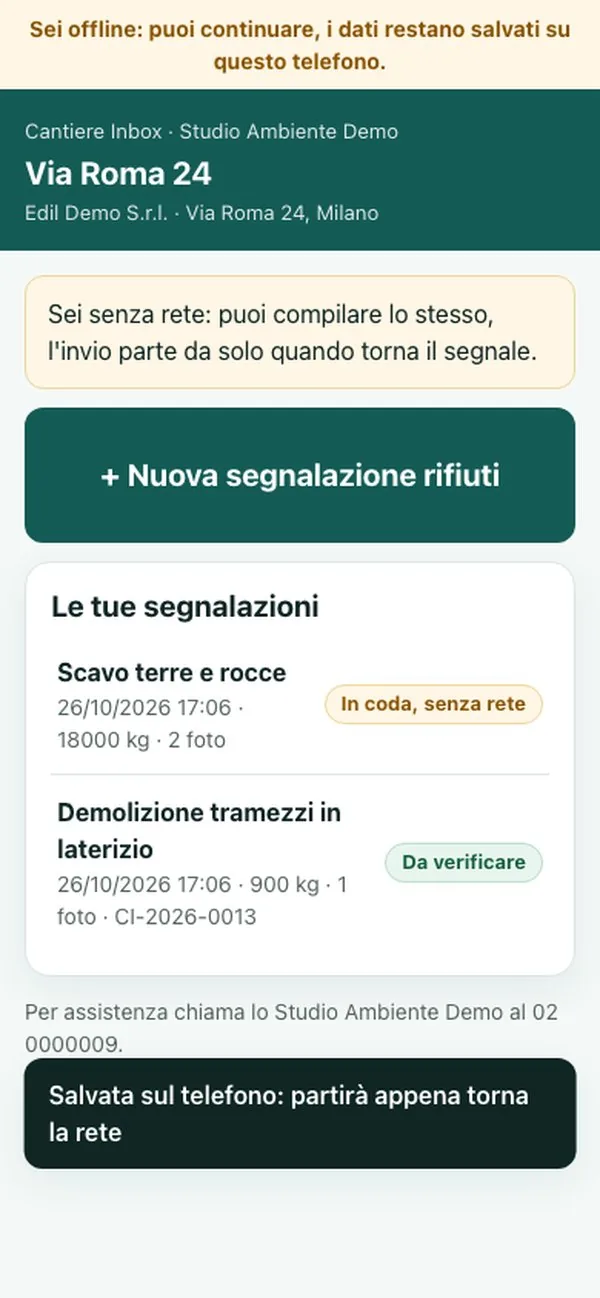
Site app without signal (in Italian) with a report queued that sends when the signal is back

In the office

Complete records, ready for your software.

Before reaching the queue every record passes ten checks for missing data, mirror entries, quantities out of range, carrier and plant. The consultant confirms the EER code, approves and exports in the format of the software already in use.

  • EER code proposed from your firm’s list, decided by the consultant
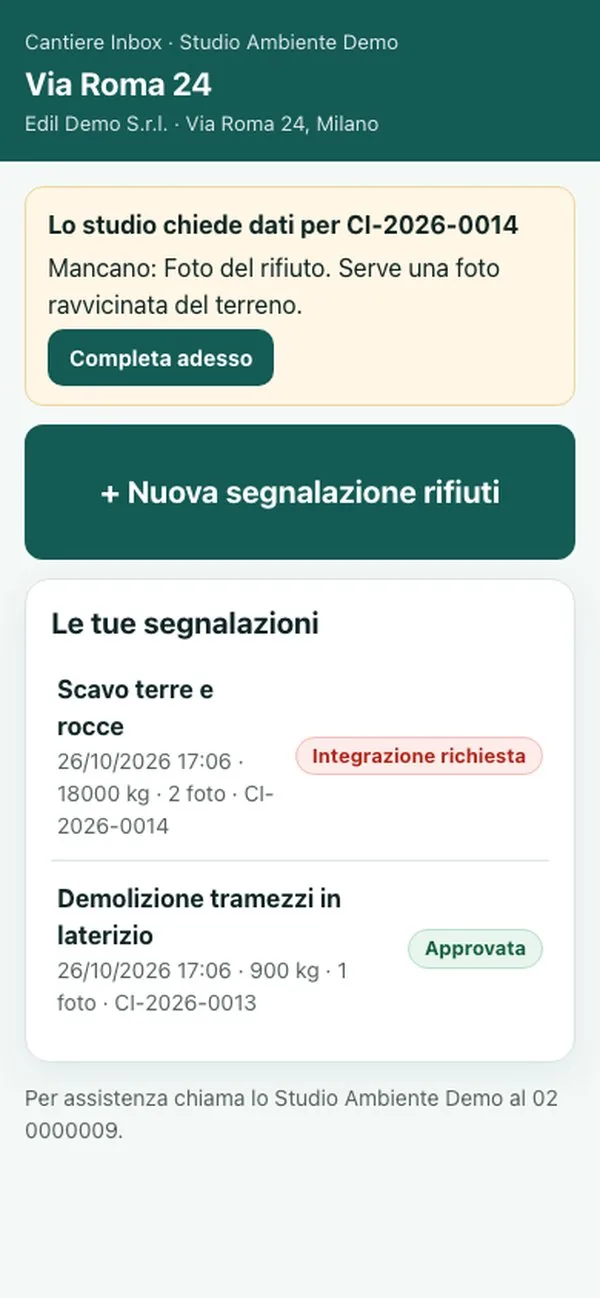
  • Ask the site for missing data with one tap
  • CSV or Excel export, tested with a sample file in your software
  • Activity log that cannot be edited, showing who did what and when
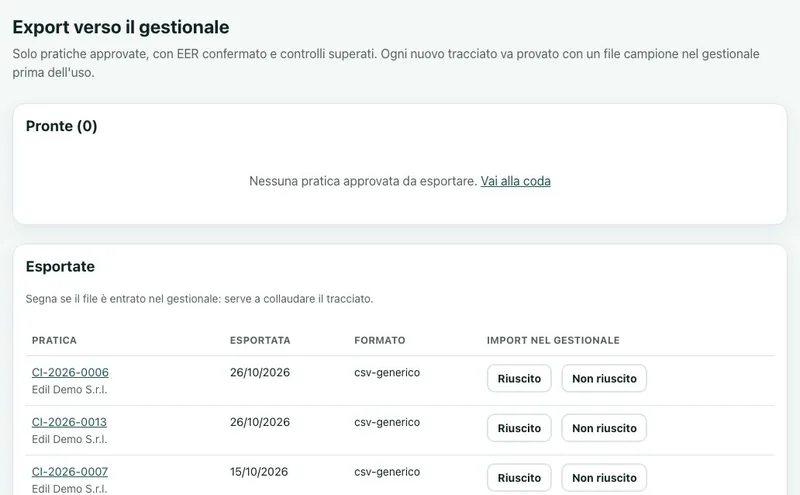
Export to your software (in Italian) with records exported as CSV with the import confirmation

Deadlines

All your firm’s deadlines on one board.

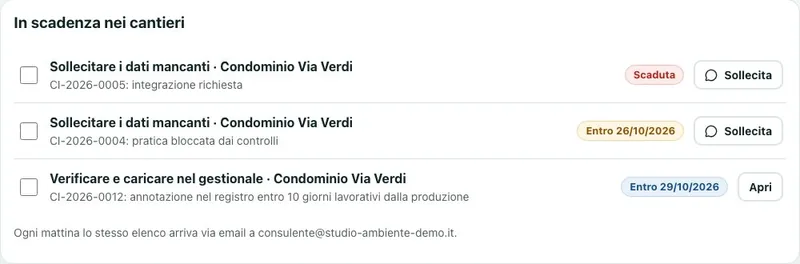
Records due within 10 working days, blocked records, missing data, forms without an outcome, the board lines them up by client and date. Every morning the same list arrives by email. For stalled records the reminder is already written.

  • Real working days, without Sundays or Italian public holidays
  • WhatsApp reminder with one tap, with the site link
  • Morning email to whoever follows each client
Due on site (in Italian), with missing data to chase on WhatsApp and records to load into the software within 10 working days
Your firm’s board, every morning by email too
SA
Studio Ambiente
to consultant@…
7:00
Today’s deadlines

Three records to approve, two reminders to send and one transmission due by Friday.

Client garages

The garages you follow, with FIR Officina.

Your firm’s setup includes FIR Officina licences for the garages, body shops and tyre shops you follow. They make the form on RENTRI from the phone in two minutes, with waste ready to pick, deadlines and RENTRI down mode.

  • Under your firm’s brand, not ours
  • No cost per garage
  • Fewer calls when the portal freezes
Client garages with FIR Officina
Autofficina SudUp to date
Carrozzeria Bianchi1 form without outcome
Gomme ExpressUp to date
Elettrauto RivaRegister to send
Officina Sud · FIR Officina
Today’s form, used oil 200 l

White label

Your clients see your firm. They do not see us.

Name, logo and colours are your firm’s, on the site app, the dashboard and FIR Officina. Messages and emails go out in your firm’s name. Our name does not appear.

  • Site app with your firm’s logo
  • Emails and reminders in your firm’s name
  • Your own domain, if you want
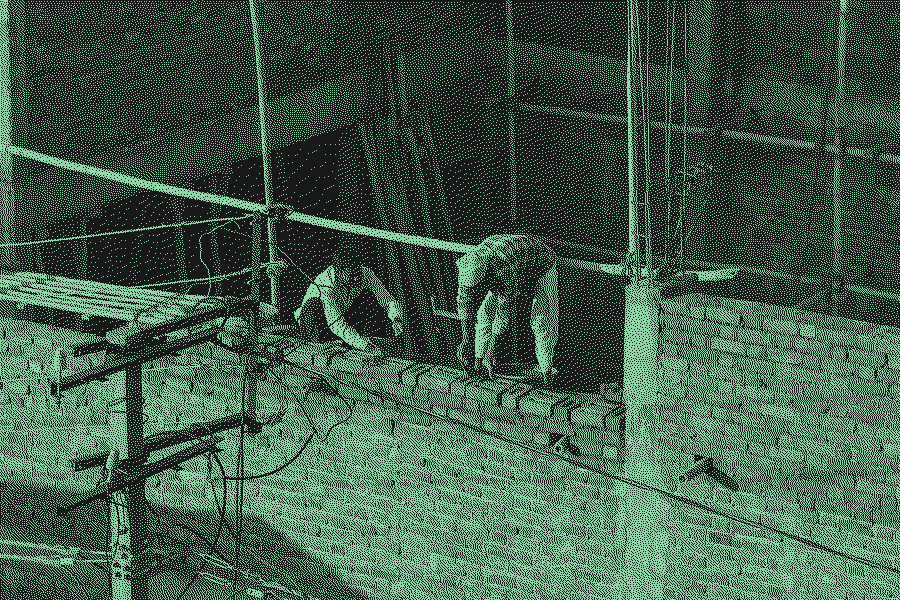
Two bricklayers working on a brick wall on a building site

From the site

One minute on site, no paperwork to retype in the office.

The demo

Try it with a sample firm.

A made-up firm with three companies and four sites. No data goes to RENTRI. The app is in Italian. To log in as the consultant use consulente@studio-ambiente-demo.it with the password demo-studio-2026. The worker’s app opens from the site link, no password.

Open the demo (opens in a new tab)
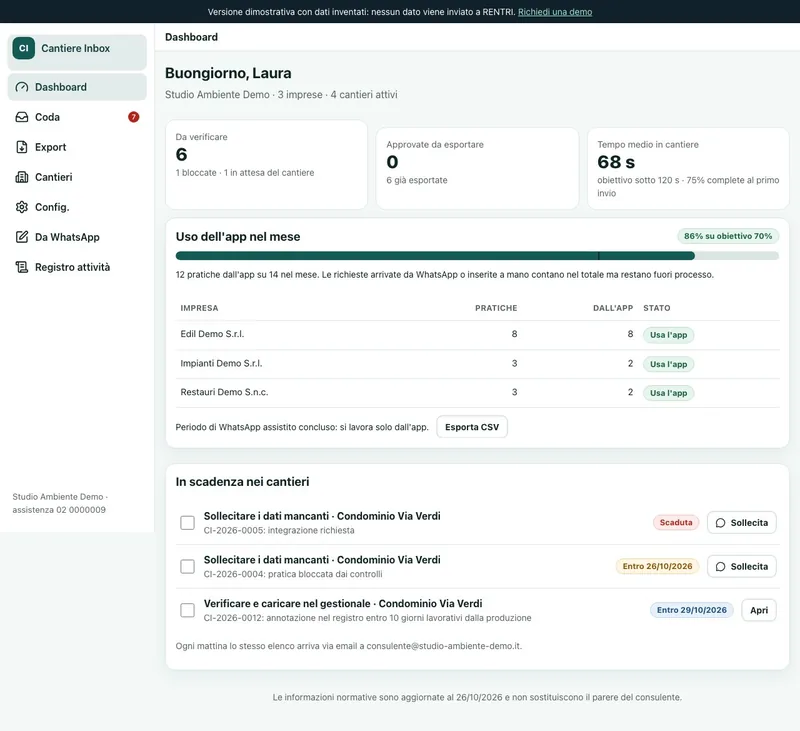
Demo dashboard (in Italian) with records to check, app use per company this month and site deadlines with reminders
Your firm’s dashboard with queue, use per company and deadlines · Open the demo site app (opens in a new tab)
On site, what did you do
Quantity estimated from the container
No signal, it sends later
The firm asks for missing data

Getting started

From the first call to the first record from site.

  1. Step 01Demo

    A half-hour video call.

    Tell us how your firm works today, with clients, software and channels. We show you the app with a sample site.

  2. Step 02Firm

    Your brand and your lists.

    Logo, colours, jobs with approved EER codes, carriers and plants.

  3. Step 03Export

    Your software’s import format.

    We test the export with a sample file in the software you use. We start only when the import works.

  4. Step 04Clients

    Companies, sites and garages.

    We load companies and sites, each with its own link. Garages get FIR Officina under your brand.

  5. Step 05Launch

    The first month with WhatsApp help.

    For thirty days you log chat requests by hand, then everyone works from the app.

  6. Step 06Every morning

    The board is already in order.

    Complete records in the queue, deadlines by date, reminders ready.

No subscription

A technical point of contact, not yet another subscription.

Environmental software is paid every year, often per client. Here you pay for the setup once and get a person to talk to for going live, the link with your software and changes when needed.

  • One-time setup, no cost per client
  • One technical contact who knows your firm
  • Custom features, with the cost agreed first
  • Support at €39/month only if you need it, otherwise €50/hour
Comparison between subscription environmental software and RENTRI for consultants
Usual subscriptionOne-time setup
A fee every yearPay once
A cost for each clientNo cost per client
You set it up yourselfWe set it up together
Tickets to a call centreWrite to a person, Marco
The vendor’s brandYour firm’s brand
Marco · technical contact Replies within one working day

Pricing

Pay once.
Not per client.

One setup for the firm, no subscription and no cost per client. You get a perpetual licence to use it. The code stays ours, the data and the Google Cloud project belong to your firm. Prices exclude VAT.

Firm

For a consulting firm or an association that follows many companies.

One-time setup

€1,990

  • Site inbox under your firm’s brand
  • Site app with no password, works offline
  • Ten checks before the queue
  • Deadline board and reminders
  • Export to your firm’s software
  • FIR Officina licences for client garages
  • No cost per client
Request a demo

The setup includes

  • Installation in your firm’s Google Cloud
  • Brand, colours and approved EER lists
  • Export tested with a sample file
  • Training for your firm
  • 60 days of bug fixes

Running costs

You pay the providers directly.

We are not a middleman. Invoices come from whoever provides the service.

Google Cloud
It depends on use and grows with records and photos. For a firm usually a few euros a month.
Alert emails
An email sending service of your choice, often free at a firm’s volumes.
Domain
About €10–15 a year, if you want the app on your own address.
RENTRI
Certificates and registrations of your firm and your clients, as today.

Support, if you want it

Support plan

€39/month

  • Error monitoring
  • Security updates
  • Rules updated when they change
  • Backup checks
  • Reply within one working day
Without the plan
On-call work, €50/h.
Custom
New export formats or changes on request, with a quote.

Updated October 2026

The dates that matter.

The sources are rentri.gov.it and the Italian Ministry of the Environment. This is general information on Italian rules and you assess each case with your clients.

16/09/2026
The digital form is mandatory for everyone registered with RENTRI (RENTRI notice of 31/03/2026).
15/09/2026
Fines apply for missing or incomplete transmission of form data (art. 258 para. 10-bis Legislative Decree 152/2006, added by Decree-Law 200/2025 converted by Law 26/2026).
10 working days
The time to record waste production and unloading in the register (art. 190 Legislative Decree 152/2006).
End of the following month
The deadline to send register data to RENTRI; for delegates the end of the second month (Ministerial Decree 59/2023, art. 15).
DD 210 of 31/07/2026
The new instructions for filling in the register and the form, July 2026 revision.
DD 25/2026 and DD 254/2026
The procedures when RENTRI services are unavailable or degraded.

FAQ

Before you ask.

Do I have to change the software I use?

No. The site inbox works before your software. It collects and checks data from site and delivers it in the import format you already use. Registers, forms and transmissions stay where they are.

Does it send data to RENTRI?

The site inbox does not, it prepares records for your software. FIR Officina does, because client garages make the form on RENTRI with the official interoperability services and their certificate, or your firm’s if they delegated you.

How do workers send the data?

From the site link or QR code, with no app to install and no password. They pick the job, give the quantity and take a photo. Without signal the record waits and sends when the signal is back.

Who decides the EER code?

Your firm. The app proposes the code from your firm’s approved list of jobs; mirror entries need the consultant’s explicit confirmation. The proposal is never binding.

How does it connect to my software?

With a CSV or Excel export in your software’s import format. Before starting we test it with a sample file and we start only when the import works.

How many clients can I follow?

The price is per firm, not per client. With more records and photos only the Google Cloud costs grow, which you pay directly to Google and which usually stay low.

What does the €1,990 setup include?

Installation in your firm’s Google Cloud, brand and colours, lists of jobs and EER codes, export testing, FIR Officina licences for client garages, training and 60 days of bug fixes. Provider costs stay separate, and support at €39/month if you want it.

Who owns the data?

Your firm. The app runs in the Google Cloud account in your firm’s name and you export records whenever you want. If one day you stop working with us, the app keeps working. The source code stays ours and you get a perpetual licence to use it.

What if I do not take support?

The app keeps working as on delivery day. You do not get rule and security updates, and work is paid on call, €50/h. You can start support later too.

Does this page replace professional advice?

No. The regulatory information is updated to October 2026 and only helps you find your way. The consultant assesses each actual case.

Request a demo

Let’s see how your firm works.

We only ask for your name, contact details and firm. We write back within one working day to set up a half-hour video call with a sample site, in Italian or English.

  1. 01
    Tell us how your firm worksHow many clients, which software, where the data comes from.
  2. 02
    We show you a sample siteFrom the worker to the record ready for export.
  3. 03
    You get a quoteWith your software’s import format. No commitment.

Prefer to write yourself? marco@milita.it

Step 1 of 3

Three questions, under a minute.

Prefer to write yourself? Email